
Queues
The queue keeps track of everything that comes in.
Calls, email, chat, Messenger and SMS. The queue is the list of what is waiting for an answer. You decide who answers what.
What is a queue?
When many people get in touch at once, not everyone can get an answer straight away. What is waiting stands in a queue, like in a shop. This is the same for a call, an email or a chat. We call each of them a case.
The queue remembers the order. It sends each case to the right person when someone is free. You can have several queues, one for each type of question. Think of a normal day: some people call, some send email, some chat on your website. Everything about invoices goes in one queue. Everything about delivery goes in another. It does not matter how the customer got in touch.
- One queue takes both calls and messages
- You choose which channels each queue takes
- One person can be in several queues
InvoicesCalls and email about payment
Finance
DeliveryChat and SMS about parcels
Customer service
UrgentWhat cannot wait
Everyone who is free. Goes before everything else.
What you see when it is your turn
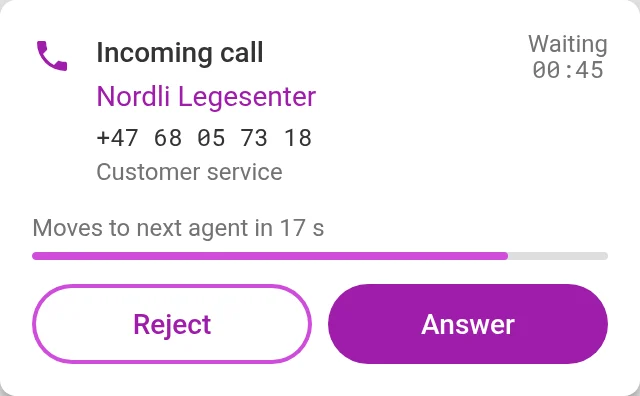
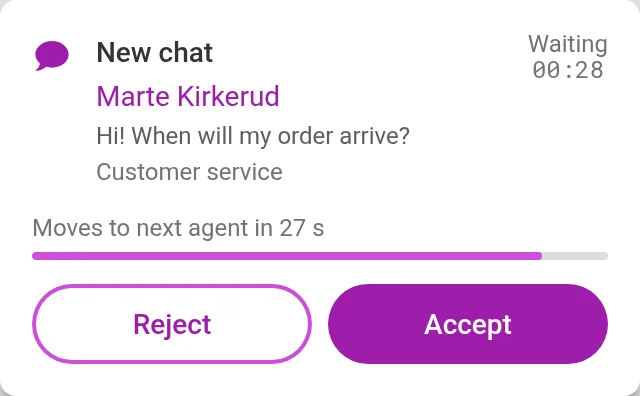
The case pops up on your screen, whether it is a call, an email or a chat. You see who it is, and how long they have waited. Press Answer or Accept, and it is yours.
- If you do not press within a few seconds, the next free person gets it
- Calls, email, chat, Messenger and SMS follow the same rules
You set the rules
Artificial intelligence follows them. It sees what the case is about, puts it in the right queue, and puts urgent cases first. It answers what you have decided, like opening hours.
Here are some example rules.
Several people are free. Who gets the case?
You choose that for each queue. Three common ways:
Everyone at once
The case pops up for everyone who is free.
- The first person to take it gets itGood when it is urgent and several people can answer.
One at a time
The case goes to one person, then to the next.
- In the order you decideFor example, the regular staff first, then the stand-ins.
- Or taking turnsThe next case goes to the next person, so everyone gets the same number.
The person who has been free longest
The next case goes to the person who has been free longest since their last case.
- The work is shared evenlyNo one has everything while others have nothing.
Questions about queues
What happens to an email that is waiting?
It stays in the queue until someone is free. No one needs to watch it, and it does not get lost.
What do callers hear while they wait?
Music or a message you have chosen. You can also let them hear how many people are ahead of them.
What happens if no one is free for a long time?
You decide. For example, the case goes to another department, or the customer gets a message.
Can colleagues from other departments help out?
Yes. Add them to the queue when it is busy, and they get cases when they are free. Take them out again afterwards.
Can one person be in several queues?
Yes. For example, one person can answer in both the invoice queue and the delivery queue.
Who decides what AI answers?
You do. AI only answers what you have set up. Everything else goes to a colleague.
See it set up the way you work
In the demo we show the channels you need, with the queues and opening hours you have today. We also answer questions about price and getting started.